
SEO
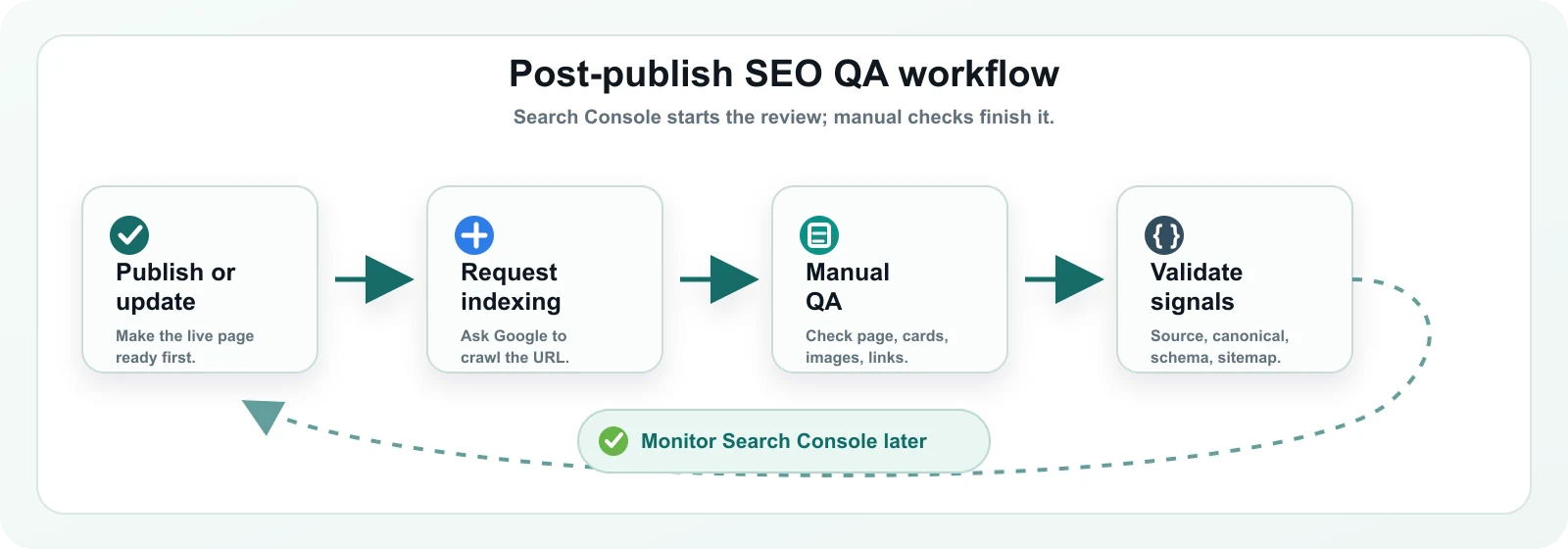
Search Console is only the beginning. Here is the manual QA workflow I use after publishing or updating an SEO article.
When I first started publishing technical SEO articles, I treated Request Indexing as the final step. The flow felt clean: publish the page, open Google Search Console, inspect the URL, request indexing, and move on to the next article. I understand why that feels complete. Search Console is an official tool, the button is clear, and the report gives a reassuring sense that Google has been notified.
Over time, I learned that publishing is not where mistakes end. It is where they become visible. A title can be updated on the article page while an older title remains on the homepage. A sitemap can keep an older lastmod until a cache is refreshed. A schema field can exist but no longer match the visible content. A screenshot can load on desktop but become hard to read on mobile.
That is why Request Indexing is useful, but I do not treat it as the end of my publishing workflow. For SeoGeo Tech, it is the point where I slow down and check whether the live website is actually showing the version I want Google and readers to see.
Google’s URL Inspection tool can show information about Google’s indexed version of a page, test whether a live URL might be indexable, and let a verified user request that Google crawl a URL. That is helpful. It is still not the same thing as checking the article, the source output, the sitemap, and the pages that link to the article. This article documents the manual QA workflow I now use after publishing or updating an SEO article.
What Search Console starts, but does not finish
For a new or updated article, I use Search Console to inspect the URL and request indexing when the page is ready. I do not use it as proof that every SEO signal is correct, and I do not expect same-day performance data to tell me whether the update worked.
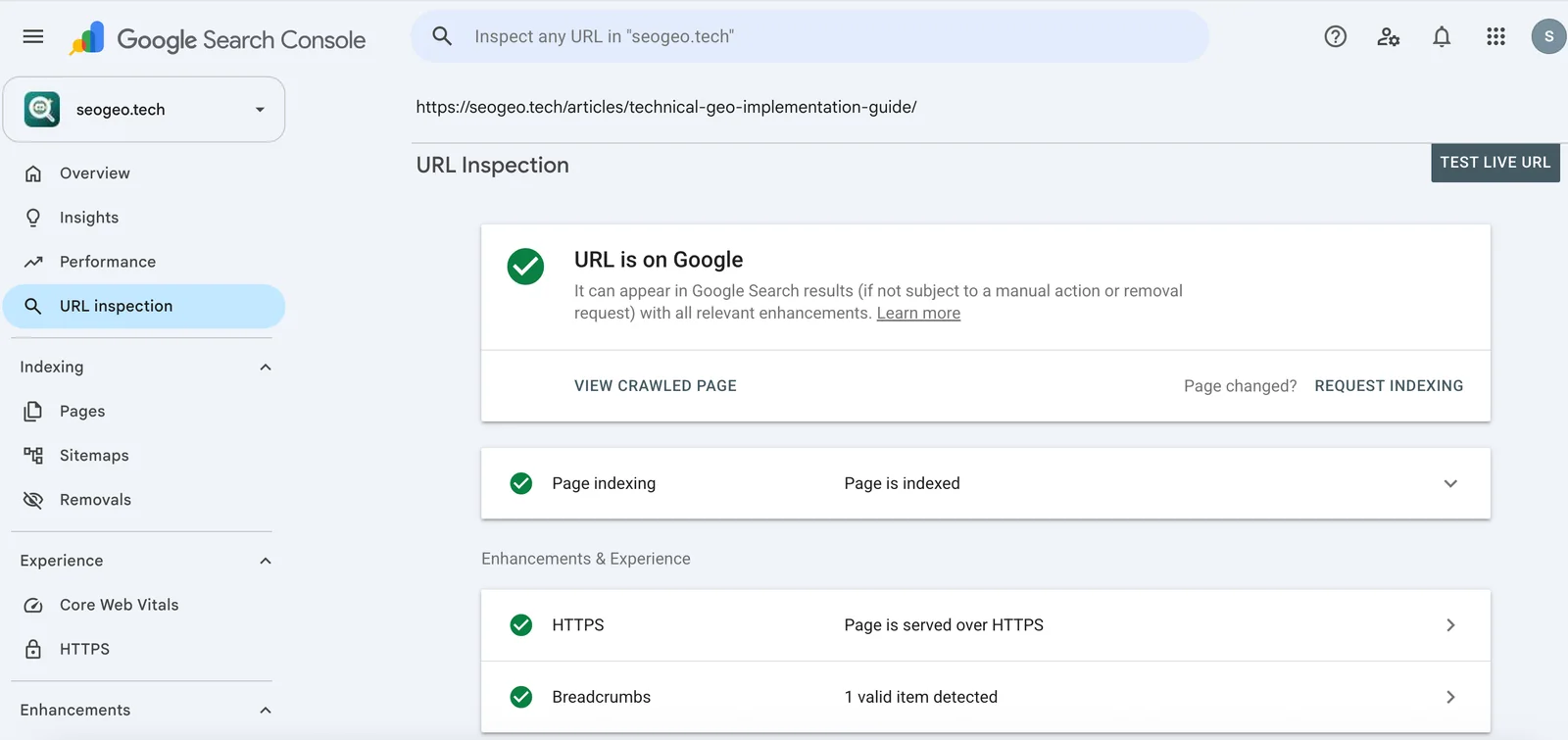
The distinction matters because Search Console looks at a URL. A real publishing update affects more than one URL. The article page can be correct while the homepage card, archive card, sitemap cache, Open Graph image, or internal link text is still behind.
Step 1: Open the live article before trusting the workflow
My first check is boring on purpose: I open the public URL in a browser. I am not checking a draft preview, WordPress editor screen, or local build. I want to see what a reader sees.
For the Technical GEO article, I checked that the live page showed the new title, the updated date, the current reading time, and the revised description. That is the baseline. If the public page is wrong, every other tool is downstream of a bad page.
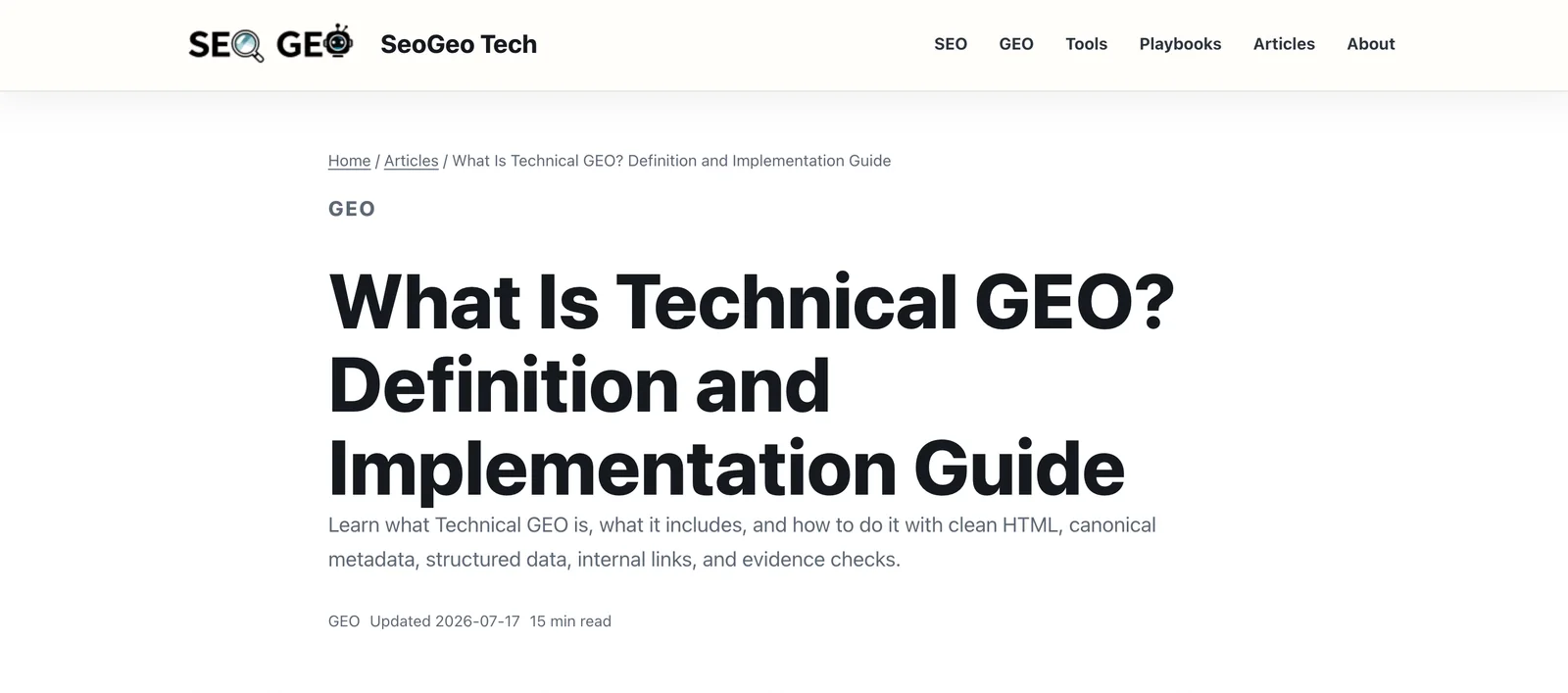
- The URL returns a normal page, not a redirect loop or error page.
- The H1 and visible title match the intended topic.
- The updated date is accurate and not accidentally changed on older articles.
- The reading time is reasonable for the final article length.
- The main images load on desktop and mobile widths.
- Captions explain what screenshots prove, not what I wish they proved.
Step 2: View source for the critical SEO signals
I still check the page source. The source is not the only thing Google can render, but it is the first place I look for critical SEO output: title, meta description, canonical, robots, Open Graph, Twitter card, and JSON-LD.
I check the original HTML before relying on browser-rendered output because it reflects the document initially delivered by the server. On a WordPress site, that first response is where the theme, SEO plugin, cache layer, and article content meet.
This check is especially important on a WordPress site because the final output can be shaped by the theme, SEO plugin, page content, featured image, and cache layer. A field can look right in the editor and still produce a different tag on the public page.
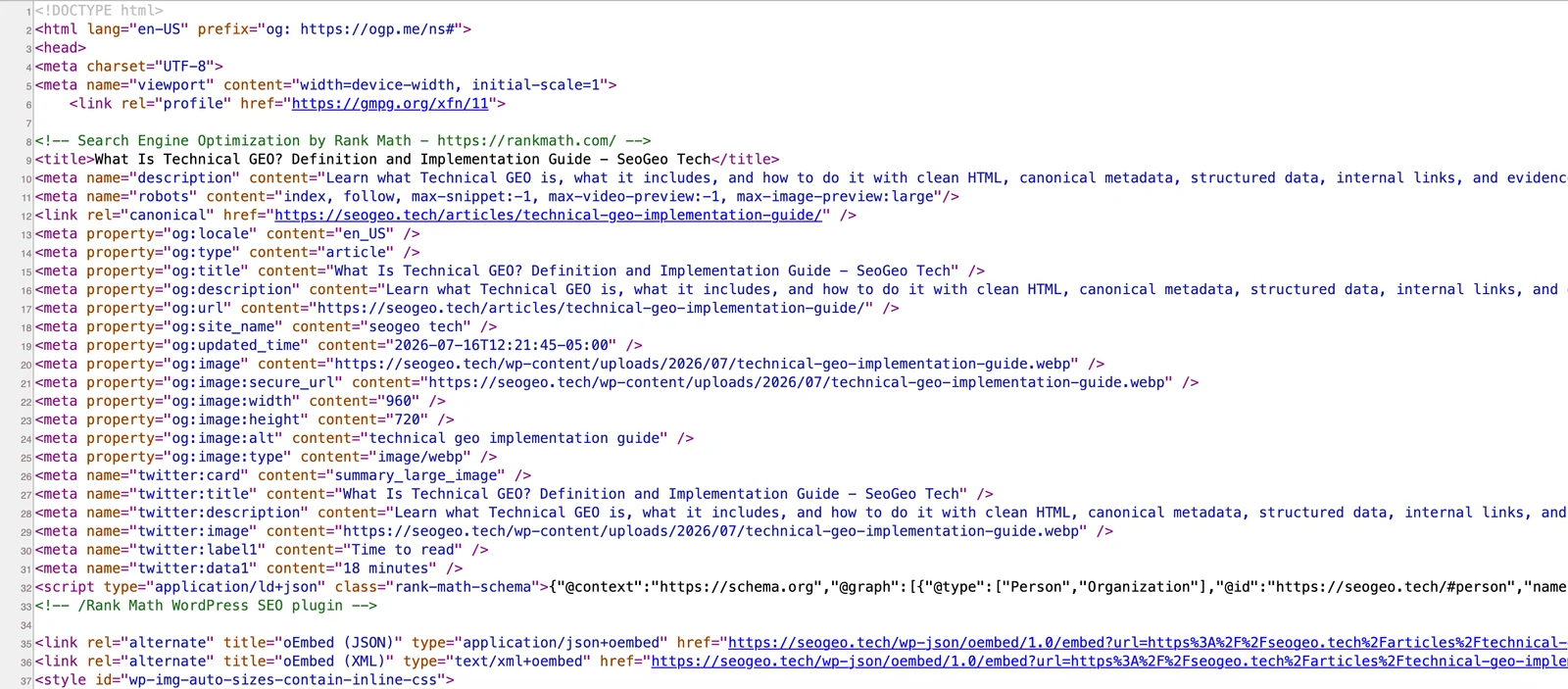
On SeoGeo Tech, I usually search the source for these strings:
canonical
dateModified
og:title
twitter:title
application/ld+json
robots
If the source and the visible article disagree, I fix the output before I ask Google to reprocess the page again. I do not want to request indexing for a version that I already know is inconsistent.
Step 3: Check structured data without overvaluing it
Structured data is not a magic layer. I check it because it should describe the visible page, not because it can rescue a weak article. My main checks are simple:
- Article schema exists.
- The headline matches the visible article title.
- The dateModified value matches the real update, allowing for timezone differences.
- The image URL loads.
- The schema does not claim content that is not visible on the page.
For implementation details, I keep the examples in Structured Data JSON-LD Examples for SEO and GEO. For this post-publish QA pass, I care less about adding more schema and more about keeping the schema honest.
Step 4: Check sitemap lastmod after the page is live
After the live page and source look right, I check the sitemap. For an updated article, the question is not just whether the URL exists. I also want to know whether the generated lastmod reflects the update.
I ran into this on SeoGeo Tech. The article was updated, but the sitemap still showed an older timestamp until I refreshed the sitemap cache. That did not mean the article was broken. It meant the generated discovery signal was stale.
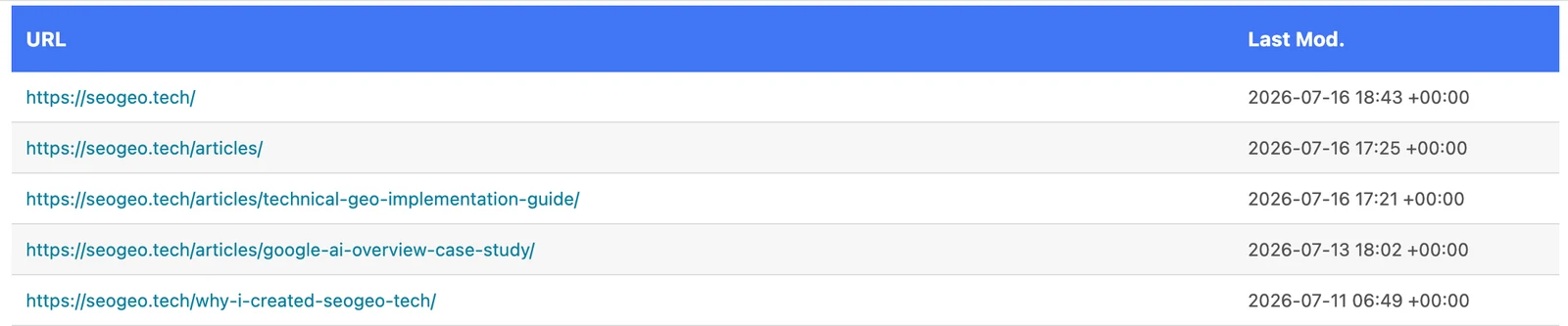
lastmod. The timestamp here is UTC, so I compare it with the local update date carefully.I do not hand-edit XML sitemap files. If the sitemap is stale, I refresh the SEO plugin or cache layer and then check again. For the exact implementation details, I keep the broader sitemap mechanics in Robots.txt and Sitemap Examples for Content Sites.
Step 5: Check the pages that point to the article
This is the step that made the workflow stick for me. Search Console can inspect one URL, but a real site has entry points. On SeoGeo Tech, an updated article can appear on the homepage, the article archive, topic pages, navigation, and recommended reading blocks.
When I updated the Technical GEO article, the article page and the article archive were correct. The homepage card was not. It still used the older title and older reading time. That is exactly the kind of issue I only catch by opening the site like a reader.

I do not always fix every old anchor text immediately. During an AdSense review, I avoid unnecessary bulk updates to older articles because that can change modified dates across the site. In this case, I fixed the homepage card because it was a primary entry point. I left older recommended-reading text for a later internal-link cleanup because the URLs were still correct.
Step 6: Do a light Google search check, then stop overreading it
Sometimes I run a simple search after publishing or updating an article:
site:seogeo.tech/articles/technical-geo-implementation-guide/
"What Is Technical GEO? Definition and Implementation Guide"
This is not a ranking test. It is not proof that Google has fully reprocessed the update. It only gives me a quick look at what may currently be visible in search. If the result still looks old the same day, I do not panic. Search systems and Search Console reports can lag behind the live page.
Step 7: Come back later for Search Console data
I do not judge a request-indexing action by clicks on the same day. After a few days, I look for a more modest set of signals: whether the URL is indexed, whether impressions appear, whether queries match the updated topic, and whether the page-level performance data is moving in a way worth investigating.
For a small site like SeoGeo Tech, impressions may appear before clicks, and clicks may remain low for a long time. That is normal. I treat Search Console performance data as an observation trail, not as a same-day pass/fail result.
What Search Console can show versus what I still check manually
| Search Console can help with | I still check manually |
|---|---|
| Whether Google has information about a URL | Whether the live page is the version I meant to publish |
| Whether a live URL might be indexable | Whether title, canonical, robots, and schema match the page |
| Requesting a crawl for a specific URL | Whether the homepage and archive cards are still stale |
| Some structured data and indexing signals | Whether visible content supports the structured data |
| Performance queries over time | Whether the article actually answers those queries clearly |
| Sitemap submission status | Whether sitemap lastmod reflects the update |
My post-publish QA checklist
This is the compact version I use after publishing or updating an SEO article:
| Check | Why I do it manually |
|---|---|
| Live URL | Verify the public page is the version I meant to publish. |
| Title and H1 | Make sure the visible topic matches the updated article angle. |
| Updated date and reading time | Avoid stale or misleading page-level signals. |
| Canonical URL | Avoid sending conflicting preferred-URL signals. |
| Robots meta | Confirm the page is not accidentally blocked from indexing. |
| Meta description and social tags | Check that previews describe the current article, not an older version. |
| Article schema | Keep headline, dateModified, image, and visible content aligned. |
| Images and screenshots | Confirm WebP files load, alt text is accurate, and captions explain the evidence. |
Sitemap lastmod | Confirm the generated discovery signal reflects the update. |
| Homepage and archive cards | Catch stale entry points that URL Inspection will not show. |
| Internal links and anchor text | Make sure the article is connected from the right places on the site. |
| Search Console follow-up | Review indexing, impressions, queries, and clicks later instead of judging the same day. |
Conclusion
For my site, Request Indexing is a starting signal, not a finish line. It tells me that I can ask Google to crawl a URL, but it does not replace a live-page review.
The value of this workflow is not complexity. It is restraint. I check the page, source, sitemap, images, and internal entry points before I draw conclusions from Search Console. That keeps me from submitting unfinished pages, overreacting to short-term data, or bulk-editing older articles during a sensitive review period.