

GEO
How I use Google Search Console's Generative AI Report to measure GEO visibility and decide what to improve next.
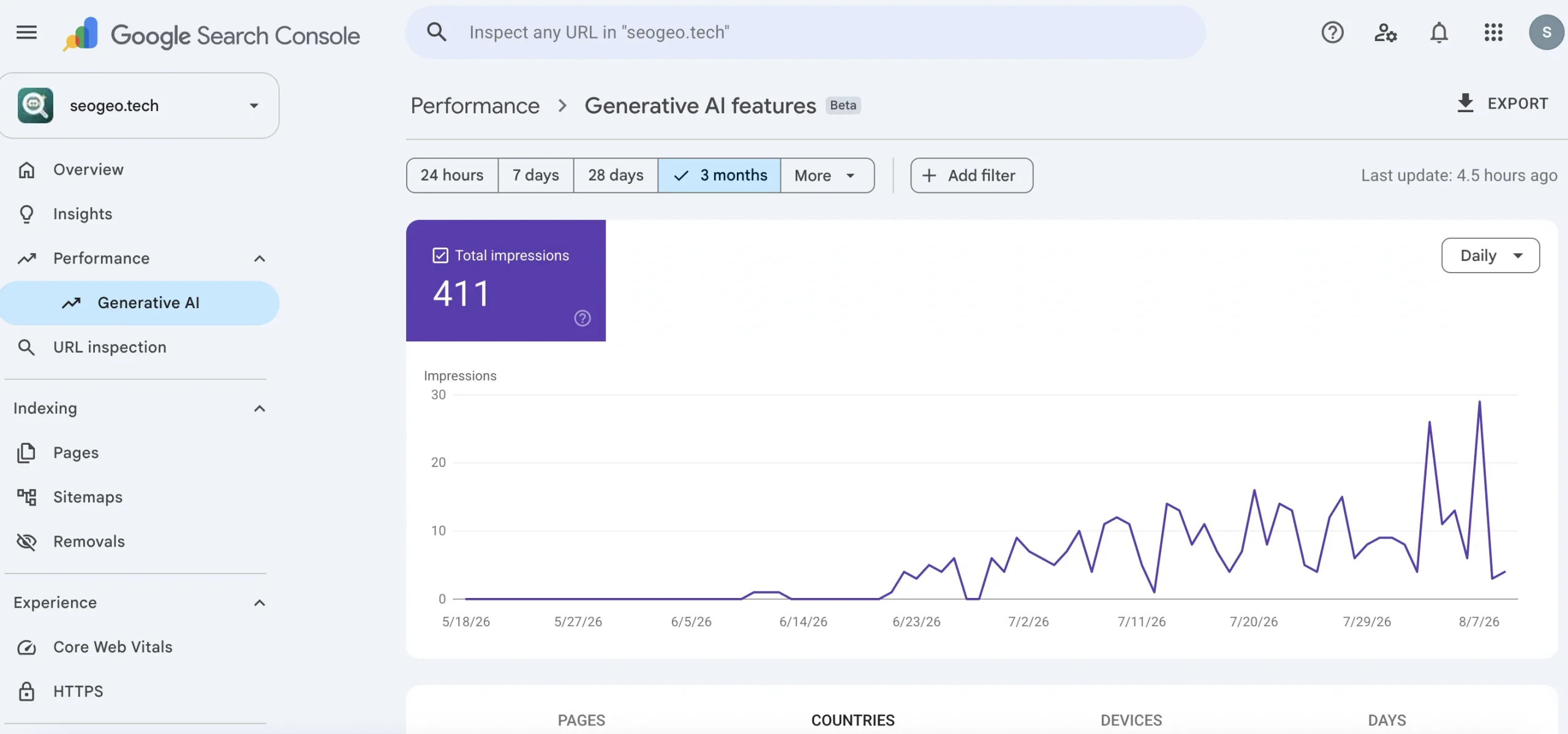
Google Search Console’s Generative AI Report does not prove AI citations or rankings. I use it as an additional AI visibility signal to guide my Technical GEO workflow.
When I first saw the new Generative AI features report inside Google Search Console, my first reaction was not celebration. It was closer to: okay, what can I safely learn from this? This is the first Google Search Console report that gives me a dedicated signal for visibility inside Google’s generative AI experiences.
SeoGeo Tech is still a small site. A number like 411 impressions over three months is not huge, and I do not want to turn it into a success story it cannot support. But the report is useful because it gives me a separate place to inspect how the site is appearing inside Google’s generative AI features.
That makes it relevant to Technical GEO. Until now, most of my GEO work used indirect signals: Search Console queries, indexed pages, manual AI Overview checks, page structure reviews, schema checks, and internal-link audits. This report adds one more layer. It does not replace those checks, but it gives me a cleaner starting point for asking better questions.
What Is Google Search Console’s Generative AI Report?
Google describes its Search Generative AI performance reports as dedicated views for impressions within generative AI features on Search, such as AI Overviews and AI Mode, with a separate Discover report for generative AI features in Discover.
Google officially labels the section Generative AI features in Search Console. In this article, I refer to it as the Generative AI Report for simplicity. Throughout this article, “Generative AI Report” refers to that reporting view.
In my Search Console account, this beta view shows impressions, then lets me break those impressions down by pages, countries, devices, and dates.
That distinction matters. This is not the same as a normal Search query report. It is not a list of keywords. It is not a list of AI citations. It is a visibility report for URLs that appeared in supported generative AI features.
Why This Report Matters
Before this report, most GEO analysis relied on indirect signals: normal Search Console queries, manual AI Overview checks, live SERP observations, and page-level QA. Those checks still matter, but they were never a dedicated AI visibility report.
Now Google is exposing a separate Generative AI Report inside Search Console. For a site like SeoGeo Tech, that gives me another official data source for AI impressions and page-level visibility. It does not solve GEO measurement, but it gives me a more informed way to measure AI visibility.
What it measures — and what it does not
The first thing I wrote in my notes was a boundary. If I do not define the boundary, I will overread the data.
| The report can help me see | The report does not tell me |
|---|---|
| How many impressions my property received in supported Google generative AI features. | Whether a page was cited, quoted, trusted, or clicked. |
| Which canonical pages received those impressions. | Which exact sentence, paragraph, heading, or source block was used. |
| Which countries, devices, and dates are involved. | Why Google surfaced a page or whether the same result will repeat tomorrow. |
| Whether AI visibility is concentrated on a few URLs or spread across the site. | Visibility in ChatGPT, Perplexity, Claude, Bing Copilot, or other AI search systems. |
| A trend I can compare against page updates and topic clusters. | A standalone GEO score or proof that a content strategy is working. |
This is why I do not call the number a win. I call it a diagnostic signal. The value is not the total. The value is what the total makes me inspect next.
How It Fits into a Technical GEO Workflow
Technical GEO is the part of my workflow that asks whether a page is easy to crawl, identify, extract, verify, and summarize without distorting the meaning. That still starts with ordinary SEO: indexable pages, stable canonical URLs, useful internal links, visible text, and structured data that matches the visible content.
Google’s own AI Search guidance says the fundamentals still matter. Pages need to be eligible for Google Search, crawlable, useful, and technically accessible. There is no special schema type or magic file that guarantees inclusion in AI Overviews or AI Mode.
So I use the Generative AI report as an observation layer, not a replacement for the work. My mental model looks like this:
| Layer | What I check | Why it matters for GEO |
|---|---|---|
| Technical SEO | Indexing, canonical URLs, robots rules, internal links, schema, and page experience. | A page that cannot be found and understood has no stable base for AI visibility. |
| Search visibility | Normal Search Console queries, pages, impressions, and click patterns. | This shows which topics Google is already testing against my site. |
| Generative AI visibility | Generative AI impressions by page, country, device, and date. | This tells me which URLs are appearing in Google’s supported AI search experiences. |
| Technical GEO review | Headings, direct answer blocks, evidence, limitations, schema fidelity, and supporting links. | This is where I decide whether a page needs clearer sections, better source context, or more useful internal links. |
That is the practical value for SeoGeo Tech. The report does not tell me what to write. It tells me where to look.
The report does not change my Technical GEO workflow. It gives me another signal to validate it.
Why the Pages tab mattered more than the total
The total number caught my eye, but the Pages tab was more useful. It showed that the impressions were not randomly attached to one throwaway URL. They were mostly attached to the parts of the site that define the topic and support the Technical GEO cluster.
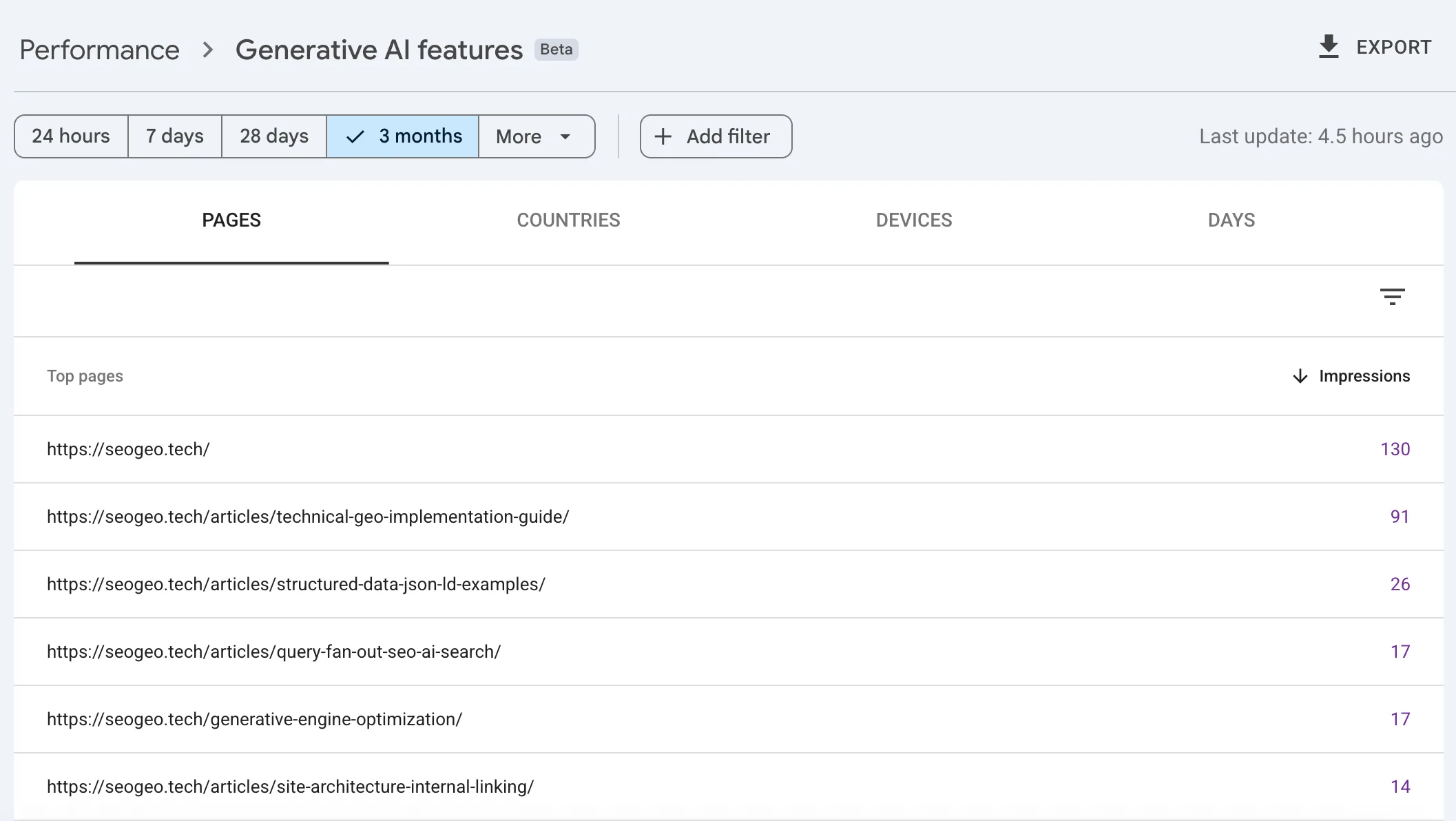
For me, this was the useful part of the report:
- The homepage received 130 impressions, which made me check whether the site’s top-level positioning still explains SEO and GEO clearly.
- The Technical GEO implementation guide received 91 impressions, which made sense because it is the main source page for my Technical GEO definition, components, and workflow.
- The structured data JSON-LD examples page received 26 impressions, which reminded me that concrete implementation pages can matter alongside definition pages.
- The query fan-out SEO article and the GEO hub each received 17 impressions, which suggested that both the concept page and the planning workflow may be part of the same AI-search topic cluster.
- The site architecture and internal linking guide received 14 impressions, which made me pay more attention to how supporting pages connect the cluster.
I am careful with the wording here. I am not saying these pages won AI search. I am saying the pages that appeared were logically related to the site’s core topic. That is enough to guide the next audit.
Countries changed how I read the signal
I also checked the Countries tab before deciding what to do. If the impressions were mostly from markets or languages I do not serve, I would treat the signal with more caution.
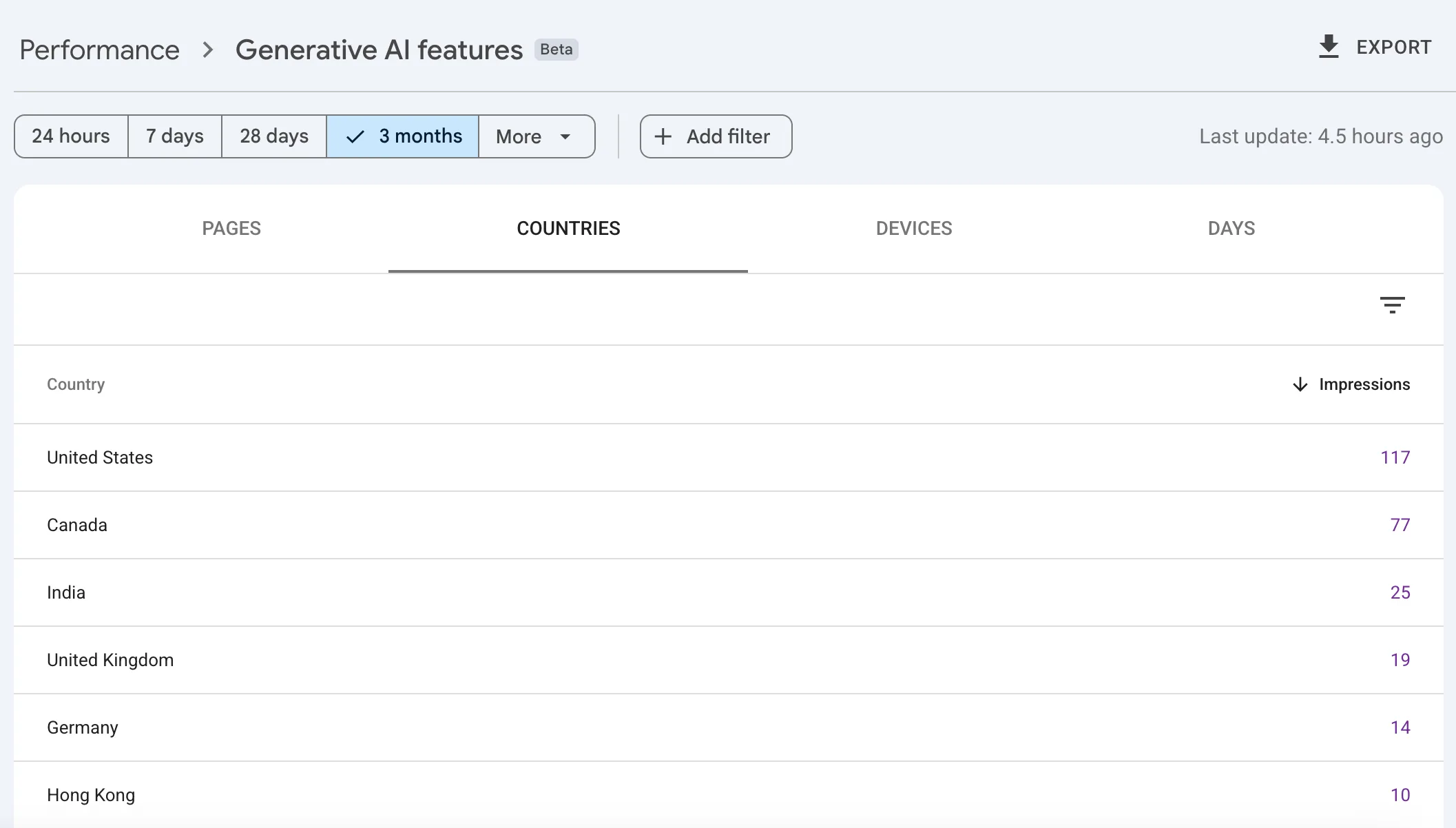
In this snapshot, the largest visible countries were the United States and Canada. That fits the way I write SeoGeo Tech: English-language technical content for search, GEO, and site owners who work with Google Search data.
Still, I do not make content decisions from country data alone. A country breakdown helps me avoid a false reading. It does not tell me whether the page satisfied the user, whether a click happened, or whether the AI feature used a specific paragraph.
Questions I asked before changing anything
When I see AI impressions, I try not to jump straight into editing. My first pass is diagnostic:
| Question | What I am trying to avoid |
|---|---|
| Which pages received impressions? | Celebrating a site-level number without knowing which URLs created it. |
| Do those pages belong to the same topic cluster? | Assuming GEO visibility when the data may be scattered or brand-heavy. |
| Do normal Search Console queries point to similar topics? | Separating AI visibility from the search demand the site already has. |
| Does each page have clear answer sections? | Updating metadata while leaving the main content vague. |
| Are supporting pages internally linked in a natural way? | Leaving useful implementation guides isolated from the main source page. |
| Has anything changed recently? | Attributing a trend to GEO work without checking publishing dates, updates, or site changes. |
This is the same habit I use after publishing. A report can point me toward a page, but I still need to open the page, inspect the visible content, and check whether the experience matches the data. That is why my post-publish SEO QA workflow still matters even when Search Console gives me a new report.
My Technical GEO Workflow
This is the workflow I currently use on SeoGeo Tech.
- Open ReportOpen the Generative AI Report in Search Console.
- Review PagesFind which URLs received AI impressions.
- Compare Search DataCheck normal Search Console patterns.
- Audit Page StructureReview headings, answer blocks, links, and evidence.
- Decide Next StepImprove, monitor, strengthen internal links, or write.
- Open the Generative AI features report. I start with the selected date range and total impressions, but I do not stop there.
- Switch to Pages. I want to know which URLs are actually involved.
- Compare pages to the site’s topic map. If the same cluster keeps appearing, I treat it as a signal that the cluster deserves maintenance.
- Open each visible page. I check the title, H1, headings, first answer block, tables, screenshots, internal links, and references.
- Compare with normal Search Console queries. If a page has both normal Search impressions and generative AI impressions, I look for shared intent.
- Decide: improve, link, write, or wait. A new article is only one possible answer. Sometimes the better action is a clearer H2, a stronger internal link, or no action at all.
For example, if the Technical GEO guide keeps receiving generative AI impressions, I do not immediately write another “What is Technical GEO” article. I first check whether the existing guide still has a direct definition, a components table, a workflow, and links to supporting pages. If the page is already strong, I may simply monitor it.
If the structured data page keeps appearing, I would review whether its examples are still accurate and whether the page clearly says that structured data should match visible content. That is more useful than adding vague AI keywords to the article.
How it fits into SeoGeo Tech
This report also changed how I see the site as a system. SeoGeo Tech is not only a list of articles. It is becoming a small technical library around a few connected topics: Technical GEO, AI search, query fan-out, structured data, internal linking, manual QA, and real AI search observations like my Google AI Overview case study.
The Generative AI report gives me a way to check whether that system is visible from another angle. If the homepage, GEO hub, and supporting implementation guides all appear in the report, I can review the cluster as a cluster. If only one page appears, I can ask whether the supporting pages are too isolated. If an unexpected page appears, I can inspect whether Google is associating the site with a topic I have not covered well enough.
This is also where my AI Search Content Gap Analyzer fits naturally. I do not use the tool to replace Search Console. I use it after Search Console gives me a page or query pattern worth checking. The report tells me where to look; the analyzer helps me inspect whether the page actually answers the relevant intent.
What I would not do with this report
The easiest way to misuse this report is to turn it into an AI SEO scoreboard. I am deliberately avoiding that.
- I would not claim that 411 impressions prove GEO success.
- I would not claim that a page was cited unless I can see citation evidence elsewhere.
- I would not rewrite every page that receives a small number of impressions.
- I would not create a separate article for every URL that appears in the report.
- I would not use this report to measure visibility in non-Google AI systems.
- I would not add fake authority signals, hidden text, or unsupported claims to chase AI visibility.
During an AdSense review, this restraint matters even more. I would rather publish one grounded case study with clear limits than write a dramatic article that overpromises what the data can prove.
My lightweight checklist
When I review the report again, this is the checklist I will use:
- Record the date range before comparing numbers.
- Check total impressions, then immediately switch to Pages.
- Separate homepage visibility from article-level visibility.
- Look for topic clusters, not isolated vanity numbers.
- Check countries and devices before drawing conclusions.
- Open the visible pages and review the actual content.
- Compare generative AI impressions with normal Search Console queries.
- Improve source pages before creating overlapping articles.
- Document what changed, then wait for enough new data.
Conclusion
The Generative AI report does not tell me whether SeoGeo Tech has “won” AI search. It tells me where the site is appearing inside Google’s supported generative AI features, and which pages deserve closer review.
That is enough to make the report useful. For Technical GEO, I do not need one magic metric. I need a chain of evidence: indexable pages, useful content, clear structure, real internal links, Search Console query data, and now a separate generative AI visibility signal.
For me, the report is not a scoreboard. It is a diagnostic layer. The next question is not “How do I increase this number tomorrow?” The better question is: “Which visible pages should I make clearer, more useful, and easier to trust?”
For me, this report is not the end of GEO measurement. It is the beginning of a better workflow.
References
- Google Search Central Blog: Introducing Search Generative AI performance reports in Search Console
- Google Search Central: Optimizing your website for generative AI features on Google Search
- Google Search Central: AI features and your website
- Google Search Console Help: Generative AI performance report for Search