
SEO
How I use Google Search Console on SeoGeo Tech to decide whether to write, improve, or wait.
I used to think a publishing day meant opening WordPress and starting a new article. If I had a topic idea, I wrote it. If the topic sounded close to SEO or GEO, I could usually convince myself it deserved a page.
That felt productive, but it also created a quiet problem: ideas are not the same as demand, and demand is not always a reason to create another URL. On a small site like SeoGeo Tech, one unnecessary article can split a topic that should have stayed together. A new post can feel like progress while it actually makes the site harder to understand.
So I changed the order. Before I open WordPress, I open Google Search Console. I do not use it as a magic content calendar. I use it as a reality check. It tells me what Google has already started testing, which page is receiving the signal, and whether I should improve an existing article before writing something new.
This shift happened slowly on SeoGeo Tech. At first, I wanted every useful phrase to become its own article. Then I noticed the same topic appearing in slightly different forms: technical geo, what is technical geo, how to do technical geo, technical geo elements. If I had written one post for each phrase, the site would have looked busy, but the topic cluster would have been weaker. That is when I started treating Search Console as a decision filter, not just a reporting tool.
I do not start with ideas first anymore
Ideas are still useful, but I try not to let them lead the whole process. My first question is no longer, “What do I feel like writing today?” It is, “What is Google already showing me?”
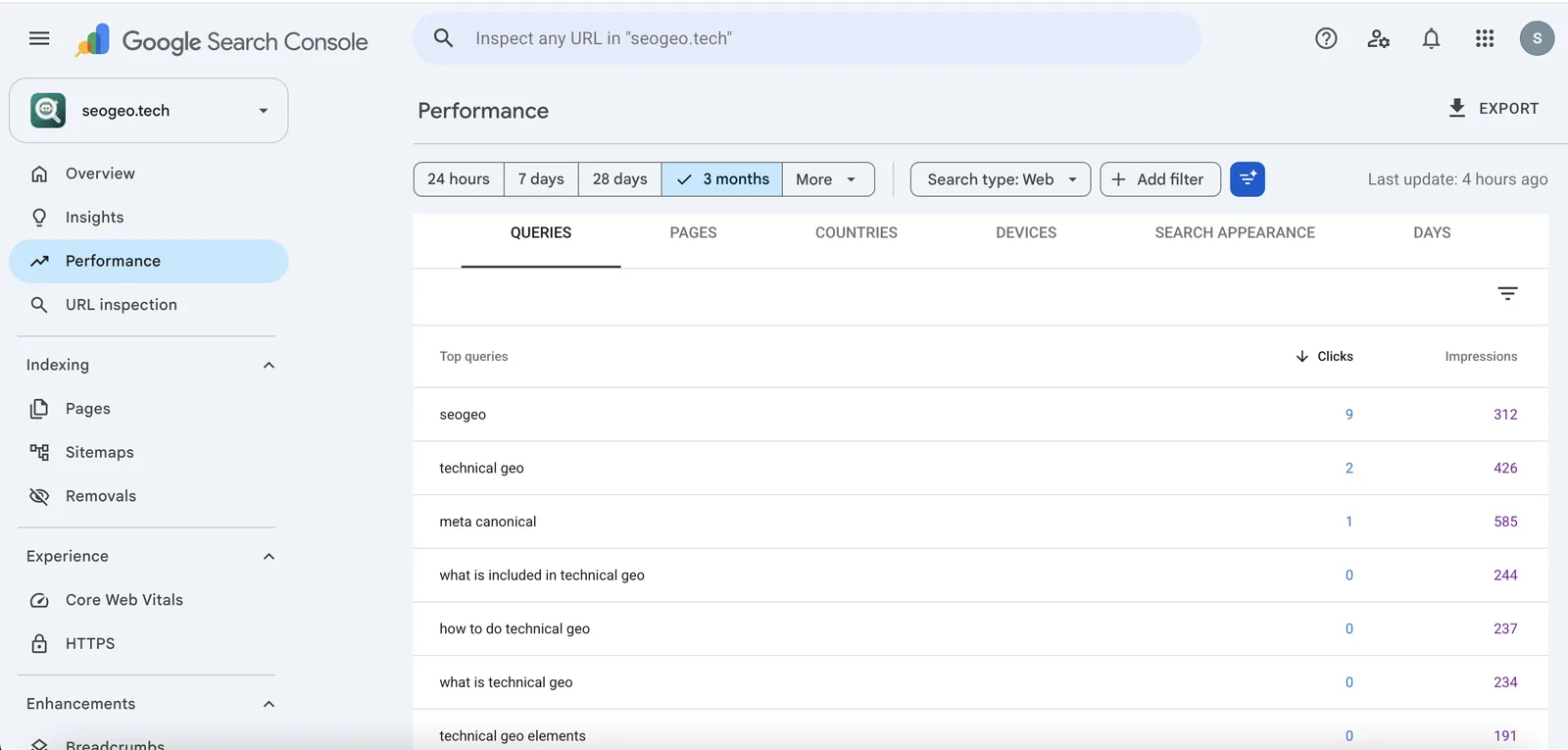
In the last three months, SeoGeo Tech started receiving impressions for queries such as technical geo, what is included in technical geo, how to do technical geo, and technical geo elements. That does not prove rankings. It does not prove AI Overview inclusion. It simply tells me that Google has seen enough relationship between my site and those terms to show pages in search results.
That is enough to slow me down. If a query already has impressions, I want to know where that demand is landing before I create anything new.
For example, meta canonical also showed strong impressions in my account. My first instinct was to think, “Maybe I should write another canonical article.” But SeoGeo Tech already has a metadata and canonical guide. So the better question was not whether the phrase was attractive. The better question was whether the existing page was the right page to strengthen.
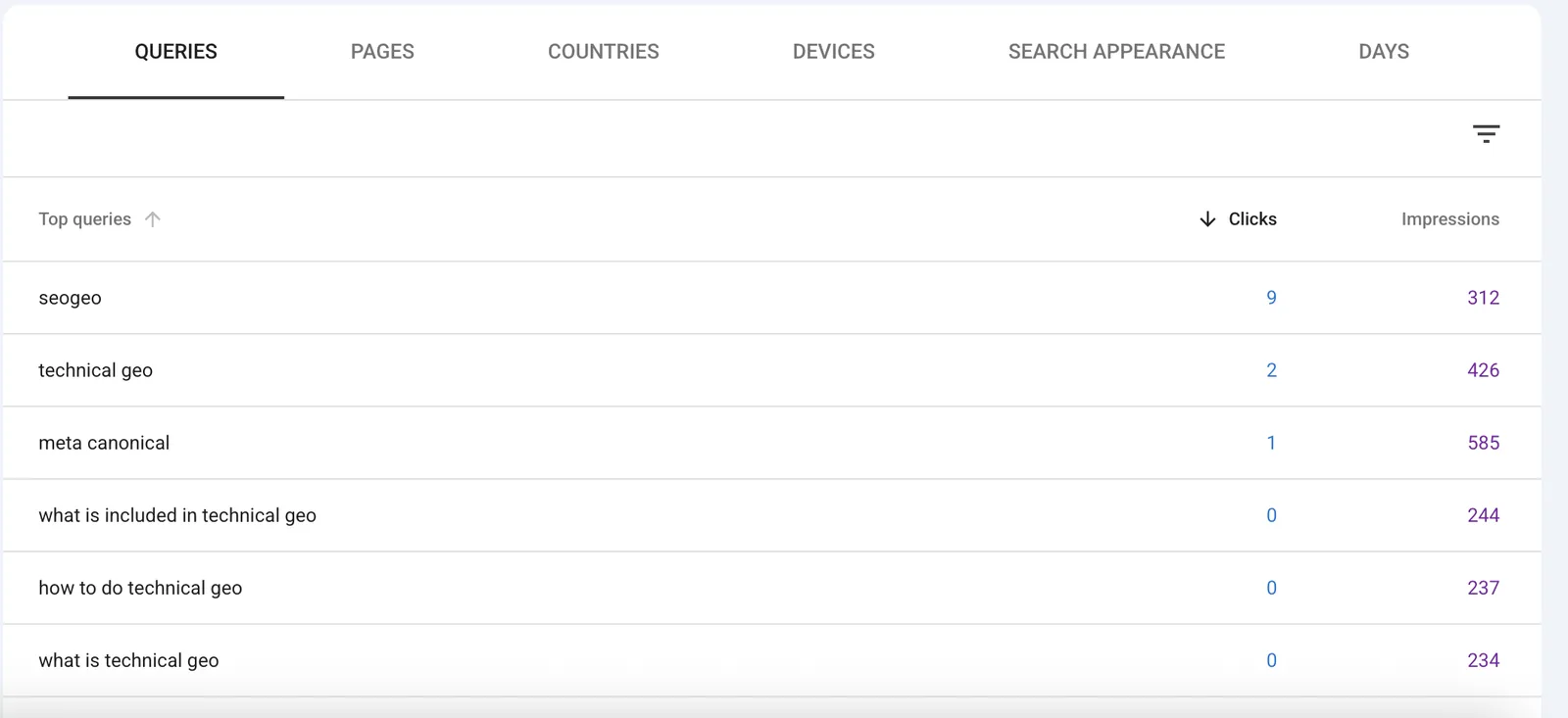
The same thing happened with the Technical GEO cluster. Seeing technical geo with 426 impressions felt like a green light. The smaller related phrases felt even more tempting because they looked like article titles: what is included in technical geo, how to do technical geo, and technical geo elements. But when several phrases point to the same concept, I try to resist the “one query, one post” instinct. That instinct creates fast output and slow site cleanup.
I look for impressions before I worry about clicks
For a young technical site, clicks can be slow and noisy. Impressions usually appear earlier. Google defines an impression as a link to the site being shown or otherwise recorded in search results, while a click is a user actually clicking through. Those are different signals, and I try not to mix them up.
When I saw how to do technical geo getting impressions but no clicks, my first reaction was not, “I need a new article with that exact title.” My reaction was more cautious: “Google is testing this intent. Which page is it testing, and does that page deserve the query?”
I have to remind myself of this because writing a new post feels more satisfying than editing a section. A new URL feels like a bigger action. But on SeoGeo Tech, the quieter action often wins: add a clearer definition, tighten an H2, improve a table, or link the section to the right supporting guide.
When I look at a query with impressions and no clicks, I do not assume the page failed. I first assume the signal is incomplete. Maybe the page is new. Maybe the snippet is not strong enough yet. Maybe the query is still being tested. Maybe the page answers the topic but not the exact angle. That uncertainty is why I check the actual page before making a content decision.
The question I ask: content problem or discovery problem?
Before I write, I try to separate two problems that look similar inside Search Console:
| What I see in GSC | What I ask myself | Likely decision |
|---|---|---|
| A query has impressions and maps to a relevant page. | Does the current page answer the query clearly enough? | Improve the existing page first. |
| A query has impressions but maps to the wrong page. | Is Google missing a better source page on my site? | Create or strengthen the right page. |
| A query has a different intent from every existing article. | Would adding it to an old page make that page messy? | Write a new article. |
| A query is vague, tiny, or unstable. | Do I have enough evidence to act yet? | Wait and monitor. |
This is the mental step I find most useful. I am not trying to produce a perfect formula. My rule is simpler: if a query fits an existing reader task, I audit that page before adding another URL.
I open the existing page before creating a new URL
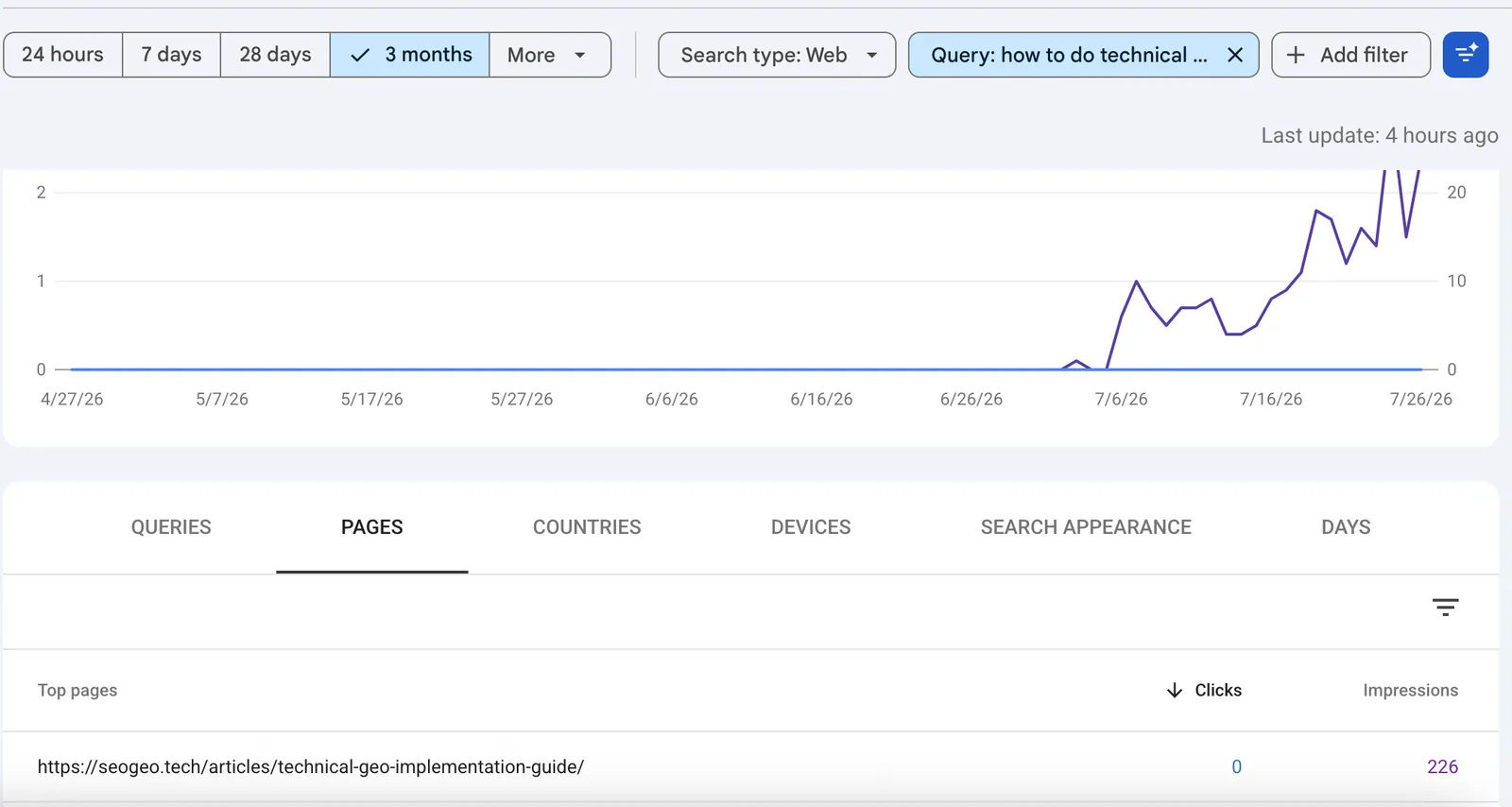
The clearest example on SeoGeo Tech was how to do technical geo. Search Console showed that the query was associated with my Technical GEO implementation guide. The page had impressions for that query, even though clicks were still low.
This was my near-miss. I almost created another article.
The query table showed how to do technical geo with 237 impressions and 0 clicks. When I filtered that query and checked the Pages tab, the Technical GEO guide accounted for 226 impressions. My first thought was honest but too fast: “That sounds like today’s article.” A clean title was sitting right there.
Then I asked a better question: why did Google choose this page?
That question changed the whole decision. If Google was already testing the Technical GEO guide for a how-to query, creating a second how-to article might split the topic. The better move was to open the existing page and check whether it deserved the query.
So I opened the article like a reader. I checked whether the page had a visible section that answered the query, whether the answer was easy to scan, and whether the section connected to the rest of the guide. In this case, the page already had a dedicated How to do Technical GEO section. That made a separate article feel unnecessary.
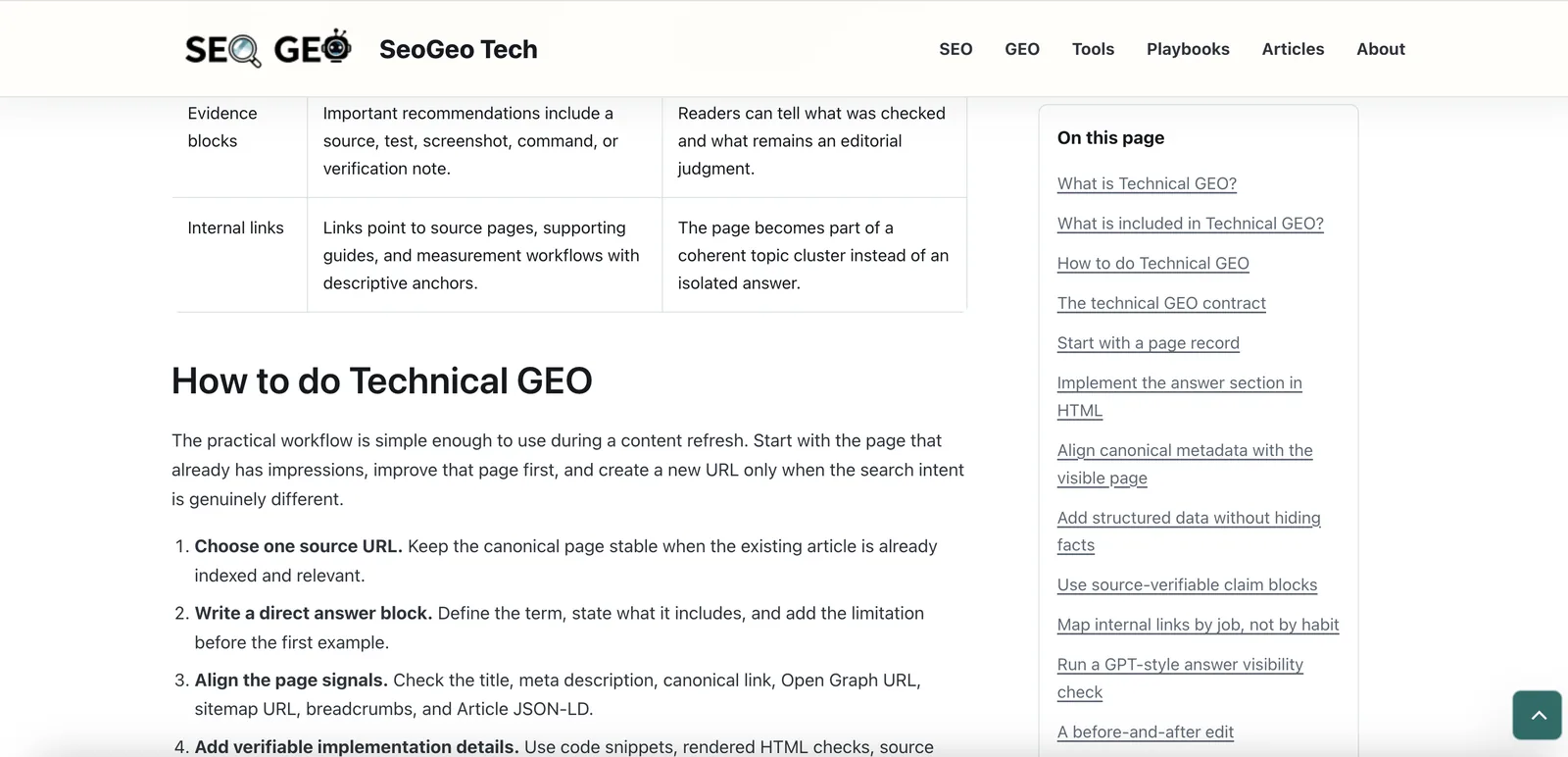
That was a useful failure to avoid. I did not publish a separate How to Do Technical GEO article. Instead, I treated the existing guide as the primary page and checked whether it needed clearer definitions, a stronger component table, or more direct examples. The result was a more useful source page, not another overlapping URL.
I ask why Google chose that page
This is the question I keep coming back to: why did Google choose this page for this query?
On SeoGeo Tech, that question is more useful than “What should I write?” because it forces me to inspect the relationship between the query, the URL, and the page structure. If Google connects technical geo elements to the Technical GEO guide, maybe the page already has enough component coverage. If it connects meta canonical to a metadata article, maybe the next improvement belongs there.
Where my own analyzer fits into the decision
After checking the page manually, I sometimes use my AI Search Content Gap Analyzer as a second pass. The analyzer never makes the decision for me. It simply gives me another opinion and forces me to look for evidence: a heading, a section, a table, or a visible answer block.
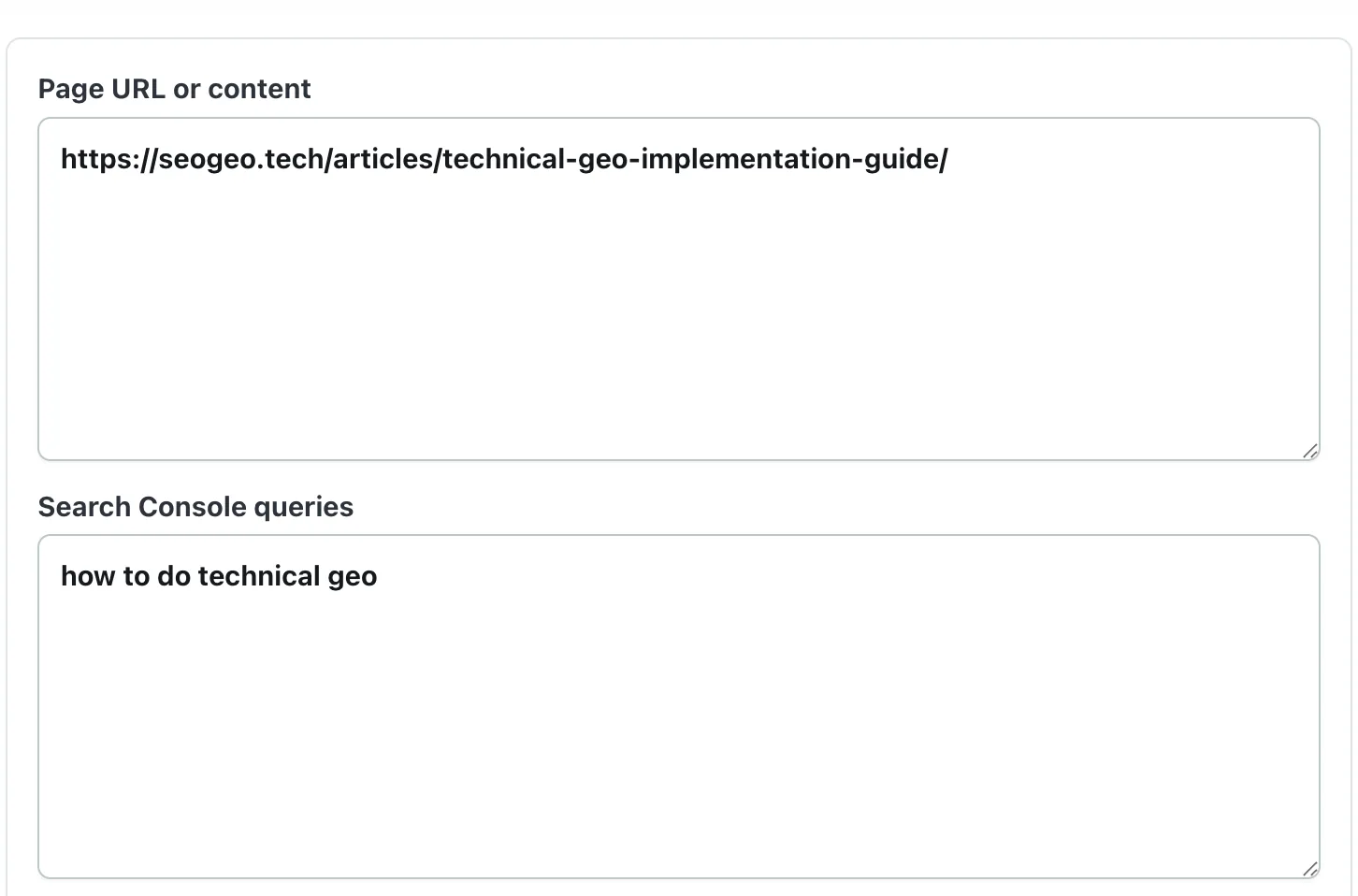
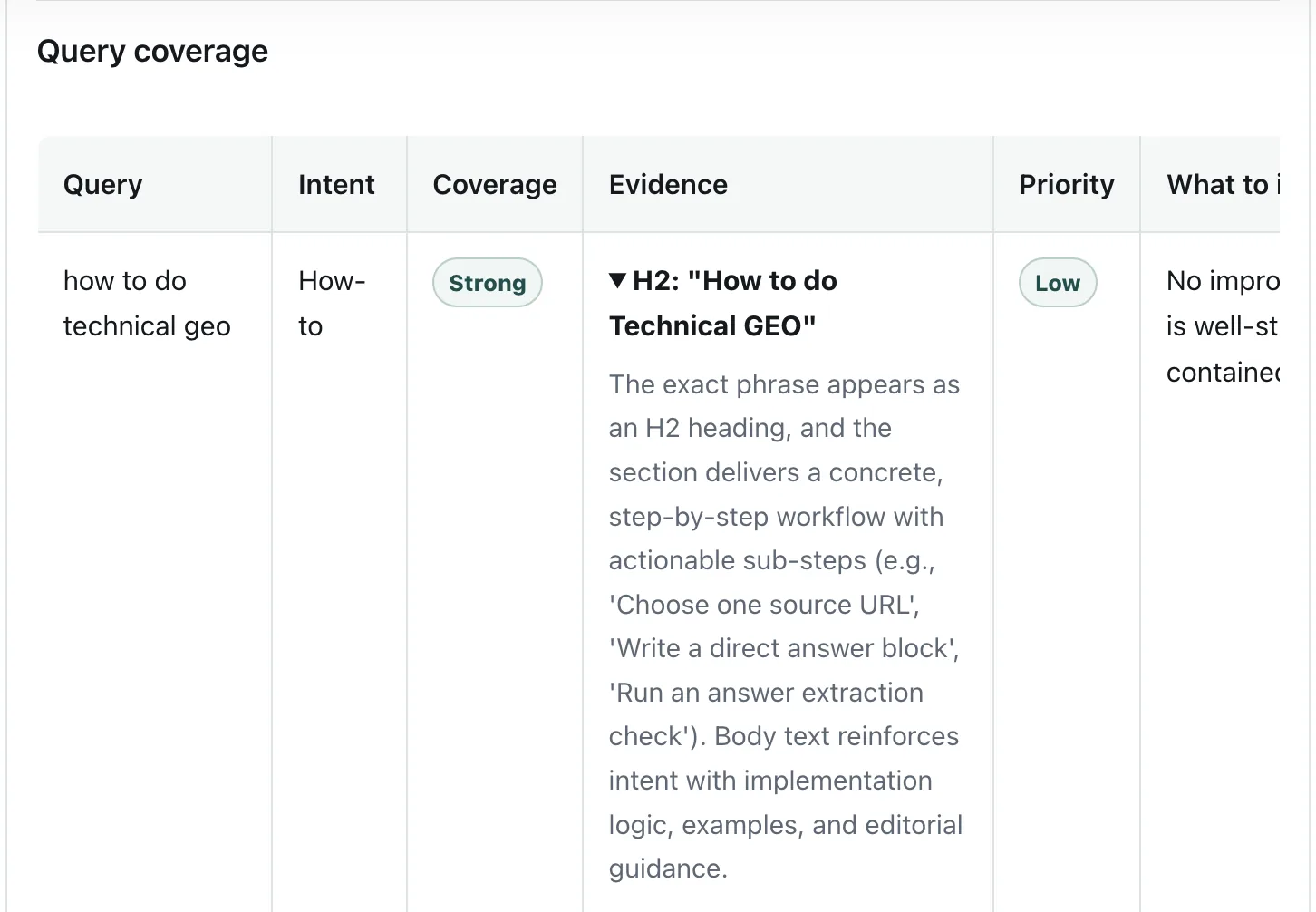
In this case, the analyzer did not give me a new topic idea. It helped me reject the wrong one. I do not chase the Strong label; the useful part is knowing when no new URL is needed.
When I actually write a new article
I usually write a new article only when three things are true.
- The query has a distinct job. It is not just a synonym of a section I already cover.
- The existing page would become unfocused if I expanded it. A guide can only carry so many side quests before it turns into soup.
- I can add something first-hand. A screenshot, a decision log, a real site example, or a mistake I actually checked is stronger than a generic explanation.
This article is a good example. I already have a post-publish SEO QA workflow. That article is about what I check after publishing or updating a page. This one is different. It is about what I check before I decide to write at all. Same ecosystem, different decision point.
That difference is the reason I am comfortable adding this URL. The old article answers, “What do I manually verify after requesting indexing?” This article answers, “How do I decide whether writing a new article is even the right move?” Those two questions may live near each other, but they are not the same reader task.
My simple pre-writing framework
This is the workflow I use before choosing the next article for SeoGeo Tech:
| Step | What I check | What the decision means |
|---|---|---|
| 1 | Open Search Console before WordPress. | I start with observed search behavior, not just ideas. |
| 2 | Read queries with impressions. | I look for early demand and direction. |
| 3 | Match the query to the page receiving impressions. | I identify whether an existing URL already owns the intent. |
| 4 | Open the live page and check the section structure. | I judge whether the answer is visible, specific, and easy to extract. |
| 5 | Run a content gap check when I am unsure. | I look for evidence such as headings, tables, and direct answer blocks. |
| 6 | Choose one path: improve, write, or wait. | I keep the site focused. |
What I do when Search Console gives me mixed signals
The messy cases are the ones that taught me the most. Search Console rarely hands me a clean instruction like “write this article.” More often, it gives me a hint that needs interpretation.
| Mixed signal | How I read it on SeoGeo Tech | What I usually do |
|---|---|---|
| Impressions but no clicks | Google may be testing the page, but the title, snippet, or answer match may not be strong enough yet. | Open the page, check the matching section, and improve clarity before creating a new URL. |
| One query fits several existing pages | The topic cluster may be overlapping or internal links may not identify the primary source page clearly. | Choose the best source page and link supporting pages to it with descriptive anchors. |
| A query lands on a related but imperfect page | Google sees topical relevance, but the exact intent may be underdeveloped. | Add a concise section only if it helps the existing page’s main job. |
| A phrase looks like a new article title | This is the dangerous one. A good-sounding title is not automatically a good URL. | Write the new article only if the intent is genuinely separate. |
| A query appears once and disappears | The signal may be too thin to act on. | Wait for more data instead of changing the site too quickly. |
For me, the most important mixed signal is still 0 clicks. It is easy to feel disappointed by zero. But zero clicks does not automatically mean the page is wrong. It means I need to check the page, the query match, the snippet, and the time window before I react.
What I avoid
The hardest part is restraint. Search Console can make every query feel urgent. I try to avoid four mistakes:
- I do not create one article per query. Closely related queries often belong on one stronger page.
- I do not rewrite a page only because clicks are low. Impressions can appear before the page has enough time to earn clicks.
- I do not treat GSC data as AI citation proof. It is search performance data, not proof of AI Overview or AI Mode visibility.
- I do not update old pages just to change the date. If I change a page, I want the change to be useful and visible.
That last rule matters to me because SeoGeo Tech is still small. I want the site to look maintained, but I do not want to create artificial churn. Real updates are fine. Empty updates are not.
Conclusion
Google Search Console does not tell me exactly what to write. It tells me whether writing is the right next move.
For SeoGeo Tech, that changed my process. I still write new articles, but I write fewer overlapping ones. I check whether the current page already deserves the query. I look for the page Google is testing. I compare the query intent with the visible section structure. Then I decide whether to improve, write, or wait.
Before I open WordPress, I open Search Console. That one habit has saved me from more duplicate articles than any content calendar ever did.
Publishing became easier when I stopped asking, “What can I write?” and started asking, “What does my site actually need?” Search Console did not give me more ideas. It helped me reject the wrong ones.