
Structured data tool
Create JSON-LD markup for common SEO page types, then validate it against the visible page before publishing. The generator favors plain, maintainable schema that matches Google structured data guidelines.
Schema generator
Choose the schema type that matches the visible page, fill in only fields you can verify, then copy the JSON-LD into your page template or SEO plugin. The output uses JSON-LD because it is the easiest structured data format for most site owners to maintain.
Example: Article schema for a SeoGeo Tech guide
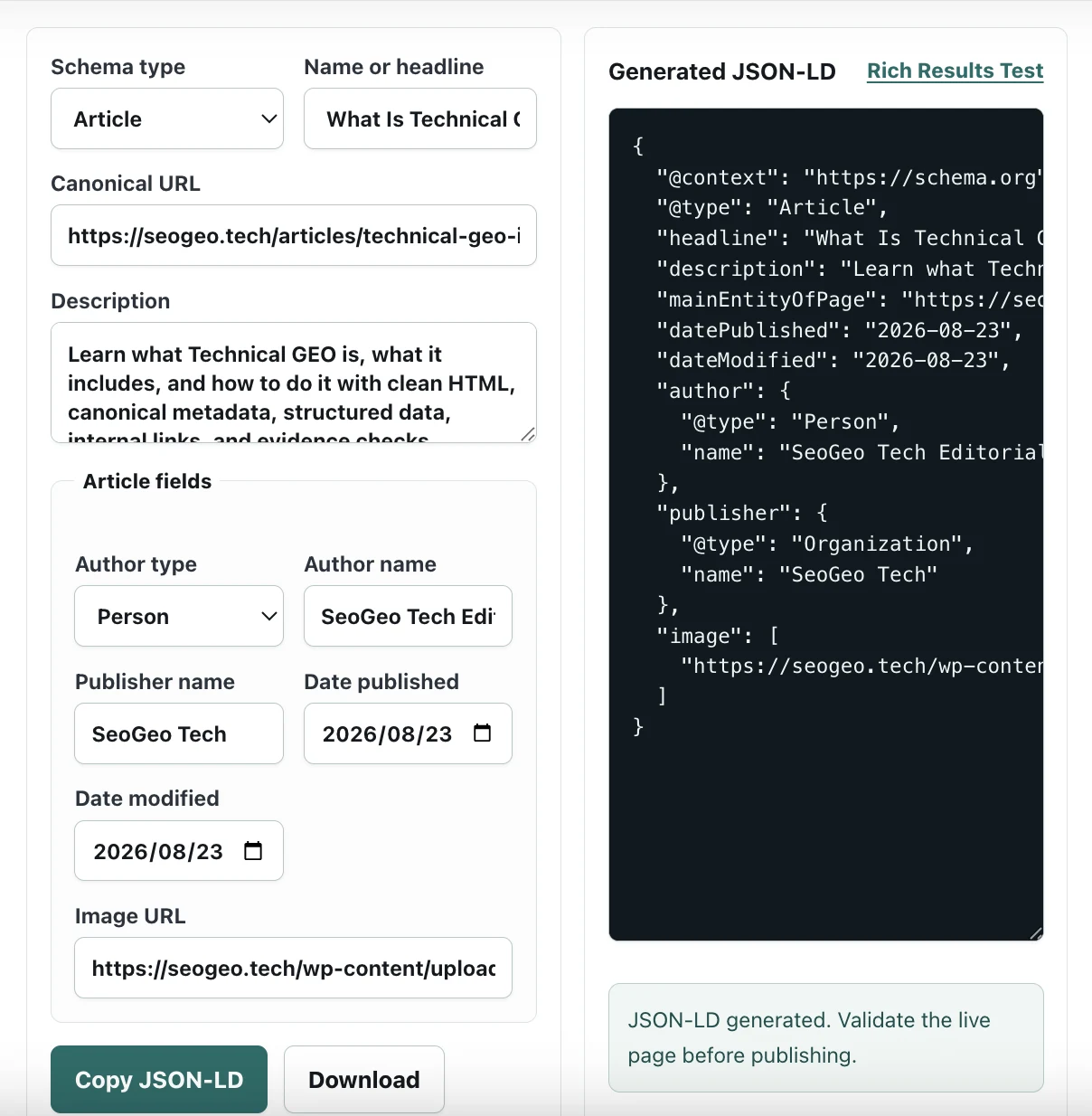
The screenshot below shows the generator being used for the Technical GEO implementation guide on SeoGeo Tech. This is the kind of structured data check I use after the visible page content already exists: the title, canonical URL, description, author name, publisher name, dates, and image URL all need to match what a reader can verify on the live page.
When to use JSON-LD
Use JSON-LD when a page has stable visible facts that search engines and other systems should understand consistently: article identity, publisher identity, breadcrumb hierarchy, product details, local business contact details, or a web application description.
Do not add structured data for facts that are missing from the page. If a Product schema includes price and availability, the visible page should show the same price and availability. If an Article schema includes an author and date, the page should make those facts clear to readers.
My JSON-LD workflow before publishing
I do not use this generator as a shortcut for inventing schema. I use it as a controlled drafting step after the page already has visible content.
- Confirm the page typeChoose Article, Organization, BreadcrumbList, Product, LocalBusiness, or SoftwareApplication only when that type matches the visible page.
- Fill verifiable fieldsUse the live headline, canonical URL, author or publisher, date, image, and description that already appear on the page or in the page template.
- Remove placeholdersDelete fields that are uncertain, unsupported, or not visible to readers.
- Validate after publishingTest the final URL with Google’s Rich Results Test or another structured data validator.
On SeoGeo Tech, I usually compare the generated JSON-LD with the live HTML source before requesting indexing or treating a page refresh as complete.
Validation checklist
- The schema type matches the main visible page type.
- The canonical URL in JSON-LD matches the canonical URL in the page head.
- Names, dates, images, prices, and business details are visible or clearly represented on the page.
- Generated markup is tested with Google’s Rich Results Test after publishing.
- Unsupported or unverifiable fields are removed instead of left as placeholders.
What this tool does not do
This generator does not guarantee rankings, rich results, AI Overview inclusion, or AI citations. It also cannot know whether the fields you enter are visible on the page. Google structured data guidelines say marked-up content should match content that readers can see on the page, so the final responsibility is still an editorial and technical review.
The tool also does not replace a live validation step. A clean JSON-LD block can still be wrong if the canonical URL points to another page, the image URL is blocked, the date does not match the article, or the page template outputs a second conflicting schema block.
Common JSON-LD mistakes to avoid
| Mistake | Why it creates low-value or misleading output | Better check |
|---|---|---|
| Adding facts that are not visible | The schema describes information readers cannot verify on the page. | Keep schema aligned with visible title, author, date, image, product, or business details. |
| Using Article schema for every page | A tool, landing page, or index page may not be an article. | Choose the schema type that matches the main purpose of the URL. |
| Leaving example values in place | Placeholder dates, images, prices, or author names can create inaccurate metadata. | Remove or replace every example field before copying the JSON-LD. |
| Ignoring existing plugin schema | WordPress SEO plugins may already output Article, WebPage, BreadcrumbList, or Organization schema. | Check the final rendered source and avoid conflicting duplicate markup. |
Reference standards
- Google Search Central: introduction to structured data
- Google Search Central: general structured data guidelines
- Google Rich Results Test